What Is MCP? Model Context Protocol Explained
 Eimantas Kazėnas Marketing & Tech
 - Published
- 7 min read
On this page What does MCP do?
Independent and reader-supported. Some links may earn us a commission; it never changes our rankings. Editorial policy
What is MCP? The Model Context Protocol is an open standard that lets AI apps like Claude and ChatGPT use outside tools and data. Here’s how it works.
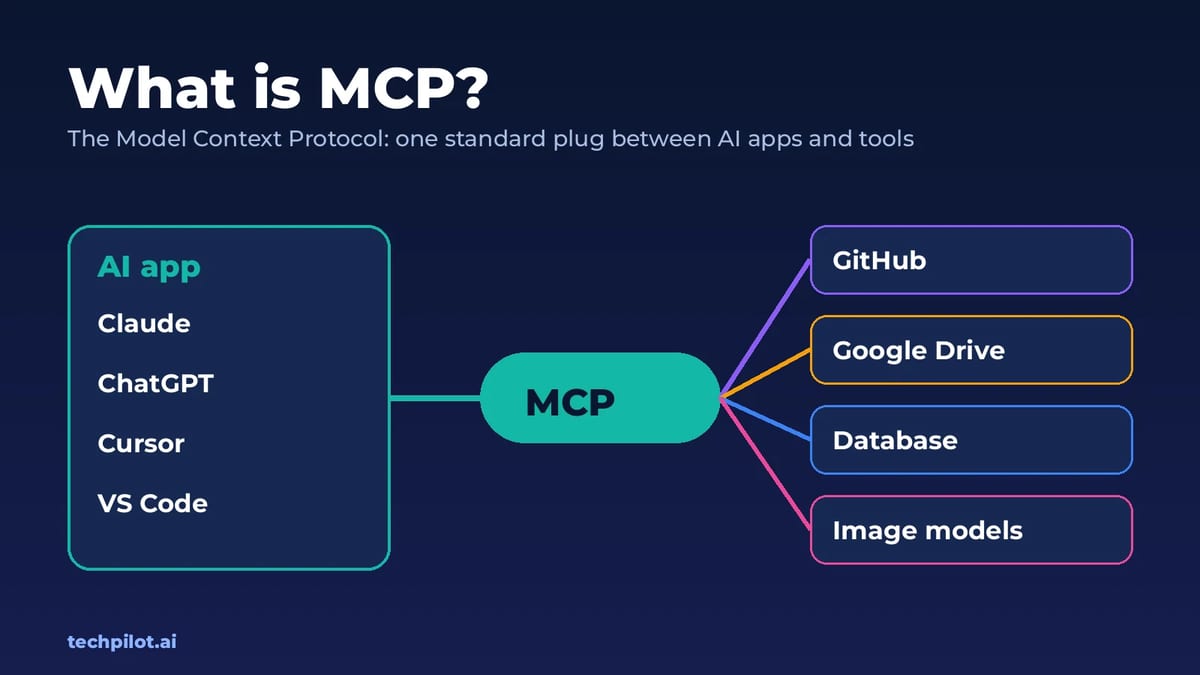
Quick answer: MCP, short for Model Context Protocol, is an open standard for connecting AI models to tools, data and apps. Instead of every AI app building its own integration with GitHub, Google Drive, a database or an image generator, the service publishes one MCP server, and any app that speaks MCP can use it. People often call it “USB-C for AI”: one standard plug instead of a drawer full of adapters. Anthropic created it, and it’s now supported by Claude, ChatGPT, Cursor, Gemini, Microsoft Copilot, VS Code and many more.
If you’ve seen “add a connector” in Claude or “add a custom MCP server” in ChatGPT, that’s MCP at work. Here’s what it is in plain English, how it works, what you can do with it today, and the security risks to watch for.
What does MCP do?
A language model on its own can only write text. It can’t open your files, check a calendar, create a GitHub issue or render a video. To do those things it needs tools, and before MCP every app had to wire up each tool separately. Ten AI apps and a hundred services meant a thousand custom integrations.
MCP turns that into a shared contract. A service describes what it can do, such as “search issues” or “generate an image from a prompt”, in a standard format. The AI app reads that list, the model decides when a tool would help, and the app makes the call and passes the result back to the model. The same server works in Claude, ChatGPT, Cursor or your own agent without changes.
How MCP works
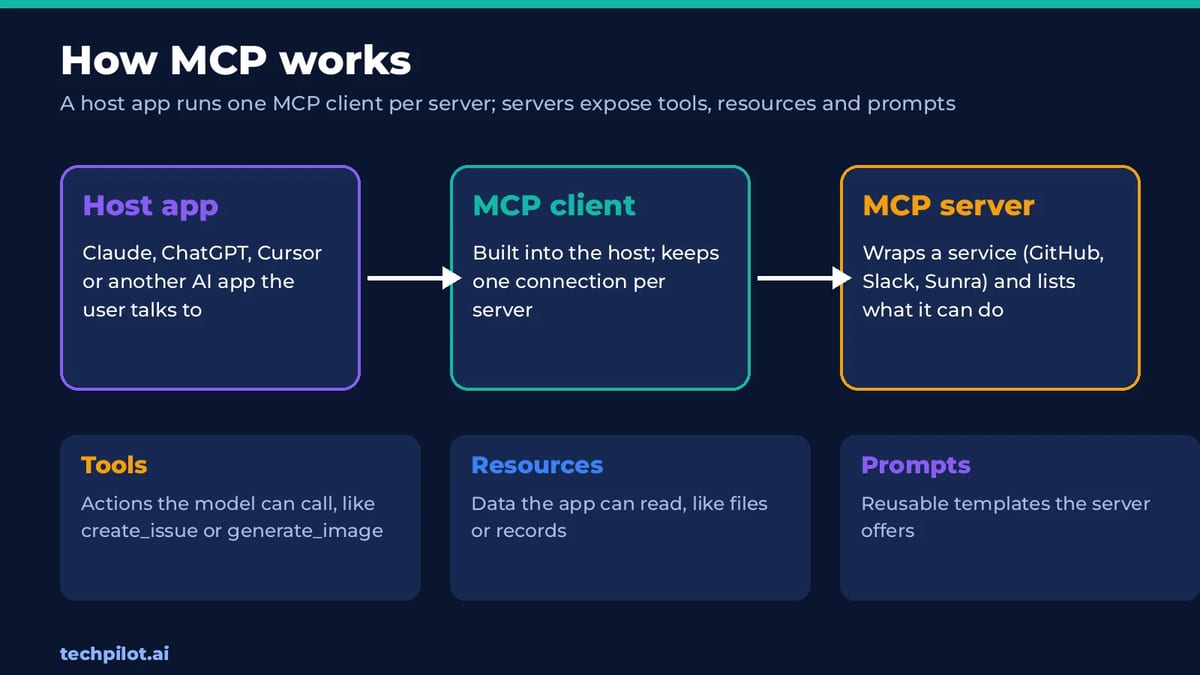
MCP has three parts:
- Host: the AI app you use, such as Claude Desktop, ChatGPT, Cursor or VS Code.
- Client: the piece inside the host that connects to MCP servers, one connection per server.
- Server: a small program that wraps a service, such as GitHub, Slack, a database or an image model, and tells the client what it offers.
A server can offer three kinds of things:
- Tools: actions the model can call, like
create_issueorgenerate_image. This is what most people use. - Resources: data the app can read, like files, documents or database records.
- Prompts: ready-made templates the server suggests for common tasks.
Servers run either locally on your computer, which suits tools that touch your files, or remotely over HTTP, which suits online services. Remote servers usually sign you in with OAuth, so you approve access in your browser and the AI app never sees your password. The current version of the MCP specification, dated July 28, 2026, made the core protocol stateless, which makes remote servers easier to run at scale.
Who made MCP, and who owns it now?
Anthropic released MCP as an open-source project in November 2024. Other AI companies adopted it through 2025, including OpenAI, Google and Microsoft. On December 9, 2025, Anthropic donated MCP to the Agentic AI Foundation, a new fund under the Linux Foundation co-founded by Anthropic, Block and OpenAI. At that point the MCP team reported over 97 million monthly SDK downloads and 10,000 active servers. The protocol’s maintainers still run its technical direction.
That neutral home matters for buyers: MCP is not one vendor’s feature that could disappear. It’s the shared standard most AI apps now build on.
What can you do with MCP today?
- Create images, video and audio in chat. Sunra MCP connects Claude and ChatGPT to image, video, audio and 3D models, and Pika’s ChatGPT plugin makes videos without leaving the conversation.
- Work with code. Coding agents use MCP servers for GitHub, issue trackers, databases and documentation.
- Search your own documents. Servers for Google Drive, Notion or a company wiki let an assistant answer from your files, a lot like RAG but through live tools.
- Run business workflows. CRM, email, calendar and support tools let an AI agent act across apps, not just talk about them.
How to use an MCP server
You don’t need to write code to use one. In most apps it takes a minute:
- Claude: open Customize, then Connectors, then Add custom connector, and paste the server URL. Many services also offer a one-click “Add to Claude” button.
- ChatGPT: open Plugins, click +, choose Add custom MCP server, paste the URL, and choose OAuth if the service asks for sign-in.
- Coding tools: Cursor, Claude Code, Codex and VS Code read MCP servers from a settings file or a command, and many server pages give you a ready-made snippet.
- Sign in and approve. Check the permissions screen before you click Allow, then ask the assistant to use the tool in plain language.
Building your own server is also approachable: official SDKs exist for popular languages such as Python and TypeScript, and a basic server that exposes one or two tools is a short script. If you want to go further, our guide to building an AI agent covers where tools fit in.
MCP vs a normal API
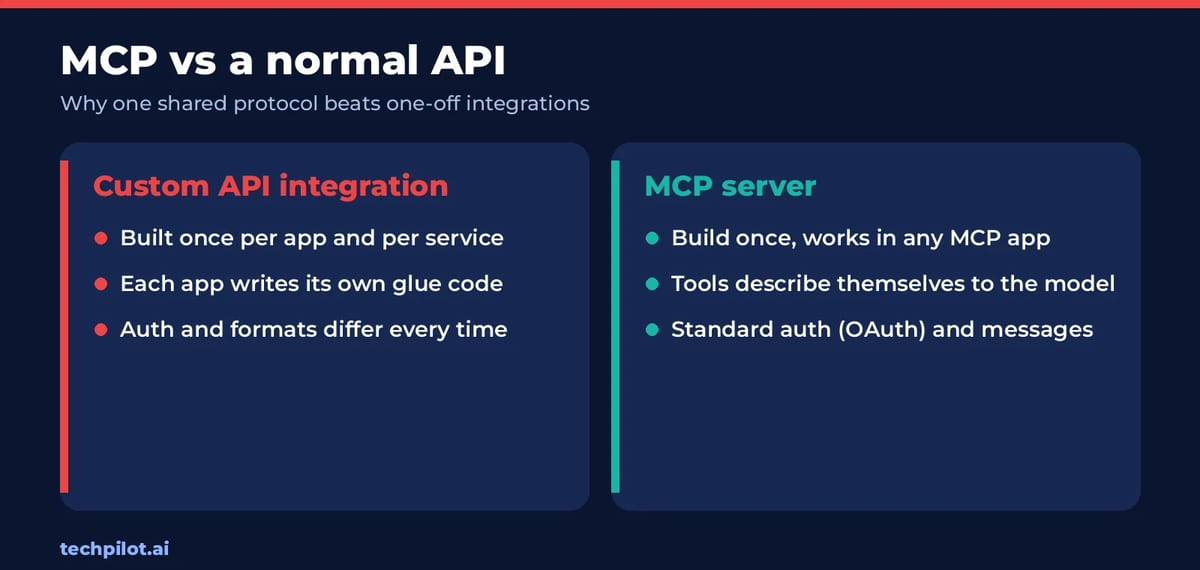
MCP doesn’t replace APIs. An MCP server usually calls a normal API behind the scenes. What changes is who does the integration work. With a plain API, every app developer writes their own glue code. With MCP, the service writes one server, the tools describe themselves to the model, and any MCP app can use them. That’s why a small company like Sunra can show up inside Claude and ChatGPT on launch day.
Is MCP safe?
MCP is only as safe as the servers you connect and the permissions you grant. The main risks:
- Prompt injection: a web page, email or file can contain hidden instructions that try to make the model misuse a connected tool.
- Malicious or sloppy servers: a server can misdescribe what a tool does or ask for more access than it needs.
- Too much power: a server with write access to email, payments or production code can do real damage if the model makes a mistake.
Practical rules: connect only servers from companies you trust, grant read-only access where you can, keep “ask before acting” approvals on for anything that sends, buys or deletes, and remove servers you no longer use. Our guide on whether AI agents are safe goes deeper, and AI agent security tools covers ways companies lock this down.
Common MCP problems and fixes
- The server doesn’t appear: restart the app after adding it, and check that the URL or command is exactly as the provider lists it.
- Sign-in loops or fails: allow pop-ups for the OAuth window and make sure you’re signed in to the right account.
- The model ignores the tool: name the tool in your request, for example “use Sunra to make an image of…”.
- Answers get slower or worse: too many connected servers crowd the model’s context. Turn off the ones you aren’t using.
The bottom line
MCP is the plumbing that turns chatbots into assistants that can act. For everyday users, it means one-click connectors that bring your tools into Claude or ChatGPT. For builders, it means writing one integration instead of ten. Start with one trusted server you’d actually use, keep approvals on, and add more as you see what helps.
Frequently asked questions
What is MCP in simple terms?
MCP, the Model Context Protocol, is a standard way for AI apps to use outside tools and data. A service publishes one MCP server, and any app that supports MCP, such as Claude, ChatGPT or Cursor, can use its tools.
What does MCP stand for in AI?
MCP stands for Model Context Protocol. Anthropic released it as an open standard in November 2024, and it is now a project of the Agentic AI Foundation under the Linux Foundation.
What is an MCP server?
An MCP server is a small program that wraps a service, such as GitHub, a database or an image generator, and tells AI apps which tools, data and prompts it offers. It can run on your computer or online.
Does ChatGPT support MCP?
Yes. In ChatGPT you can open Plugins, choose Add custom MCP server and paste a server URL. Many services, such as Sunra and Pika, also offer ready-made ChatGPT plugins built on MCP.
Is MCP the same as an API?
No. An MCP server usually calls an API behind the scenes. MCP adds a shared format so tools can describe themselves to AI models, which means one integration works across many AI apps.
Is MCP safe to use?
It’s as safe as the servers and permissions you allow. Connect only trusted servers, prefer read-only access, keep approvals on for actions that send, buy or delete, and watch for prompt injection from untrusted content.
Found this useful? Share it with someone comparing AI tools.
Best AI Model in 2026: Top LLMs Ranked
Find the best AI model for your job in 2026. We rank GPT-6, Claude Opus 5.5, Gemini 4 Argon, Grok 4.7 and open models on coding, agents, price, free…
 Eimantas Kazėnas · 16 min read

AI Agent memory management: the architecture of memory & context
Agent Memory Management is the architectural system that allows an AI agent to maintain an evolving understanding of a task, the user, and its own…
 John Daniel · 7 min read